Showing posts sorted by relevance for query jailbreak. Sort by date Show all posts
| 2 comments ]

*Read:This page has been updated and moved, click here to go to the frequently updated page. The content below is outdated but will remain here for informational purposes.*
-------------------------
To find what firmware you have, go to Settings>General>About>Version.

1.x.x represents any firmware from 1.1.1-1.1.5
2.x.x represents any firmware from 2.0-2.2.1
3.x.x represents any firmware from 3.0-3.1.1

iPod touch's

Firmware 3.x.x

How to jailbreak iPod touch 3G

Jailbreak

How to jailbreak iPod touch 2G

Jailbreak

How to jailbreak iPod touch 1G

Jailbreak

Firmware 2.x.x

How to jailbreak iPod touch 2G

Jailbreak

How to jailbreak iPod touch 1G

Jailbreak

Firmware 1.x.x

How to jailbreak iPod touch 1G

Jailbreak

iPhone's

Firmware 3.0

How to jailbreak iPhone 3G

Jailbreak

How to jailbreak iPhone 2G

Jailbreak

Firmware 2.x.x

How to jailbreak iPhone 3G

Jailbreak

How to jailbreak iPhone 2G

Jailbreak

Firmware 1.x.x


How to jailbreak iPhone 2G

Jailbreak

| 9 comments ]

With so many guides, programs, and downloads, it can get pretty confusing to a first time jailbreaker on what to do. That's why this page was setup!

Although we recommend that you upgrade to the latest firmware before jailbreaking, jailbreaks for almost all combination of firmwares, devices, and computers are out. Just match your device and firmware with the one provided below. This will take you to the page with the full guide on how to jailbreak your specific model of iPod/iPhone.

Last updated: October 28, 2010

| 1 comments ]


Is this not the right jailbreak for you? Find the one made for your device and firmware by clicking here.

The iPhone Dev Team and Comex have come out with an all-in-one online jailbreak called JailbreakMe 2.0. The process to jailbreak is fairly simple if you are an experienced jailbreaker but if not, use the guide below.

This jailbreak is compatible with the following devices:

iPad on 3.2
iPad on 3.2.1
iPhone 3G on 3.1.2
iPhone 3G on 3.1.3
iPhone 3G on 4.0
iPhone 3G on 4.0.1
iPhone 3G[S] on 3.1.2
iPhone 3G[S] on 3.1.3
iPhone 3G[S] on 4.0
iPhone 3G[S] on 4.0.1
iPhone 4 on 4.0
iPhone 4 on 4.0.1

This jailbreak, unlike some other previous jailbreaks, does not require the use of a computer.

If you are facing issues with FaceTime chat and MMS that are disabled with the jailbreak, you will need to restore your iPhone and re-download the jailbreak and the new JailbreakMe version no longer has this problem.

Read: Make sure you have already Synced your iPhone with iTunes and it is already activated with your carrier. This jailbreak will not activate it for you. If you don't have an original SIM to activate your device with, follow the steps in this guide before continuing.
  1. Tap on the Safari icon on your homescreen.
  2. In the adress bar, type in: http://www.jailbreakme.com. Then press Go.
  3. Once the page loads, a slider will be presented at the bottom of your screen. Slide it from left to right to start. (If you see a purple screen, close Safari and restart your device. Then start at Step 1 again.)
  4. Now wait for JailbreakMe to download the required files.
  5. Then JailbreakMe will begin to install the correct files and jailbreak your device.
  6. Once it's done, a message will popup saying "Cydia has been added to the homescreen."
  7. Close Safari and open Cydia, wait for Cydia to restart.
  8. Open Cydia once again.
Now you can begin installing themes, apps, games, and more in Cydia

| 16 comments ]

Is this not the right jailbreak for you? Find the one made for your device and firmware by clicking here.

Blackra1n released by GeoHotz is the first official 3.x.x firmware jailbreak for Windows and Mac. It is also the first jailbreak for iPod touch 3rd Generation! This is quick one-click jailbreak. No need choose settings or go into DFU or Restore mode. Just plug it in and hit "Make it ra1n" on your computer.

Devices Supported: iPhone 2G, iPhone 3G, iPhone 3G [S], iPod touch 1st Gen, iPod touch 2nd Gen, and iPod touch 3rd Gen
Computer Supported: Windows and Mac
Firmware Supported: 3.1.2, 3.1.1, 3.1.0, and 3.0
Necessary Downloads: Blackra1n and IPSW for your device file
Exceptions: If your iPhone is unlocked (does not use an official carrier), do not jailbreak. iPod touch 3rd Gen is a tethered (what does that mean?) jailbreak.


Downloads

Blackra1n
Download for Windows
or
Download for Mac

IPSW File
To find you IPSW file, go here.

On the second drop-down bar, find your firmware file that matches with your device. Refer to the examples below.

iPhone 2G- Find iPhone 2G (3.1.2/7D11)
iPhone 3G- Find iPhone 3G (3.1.2/7D11)
iPhone 3G[S]- Find iPhone 3G S (3.1.2/7D11)
iPod touch 1st Gen- Find iPhone 1G (3.1.2/7D11)
iPod touch 2ns Gen- Find iPod touch 2G (3.1.2/7D11)
iPod touch 3rd Gen- Find iPod touch 3G (3.1.2/7D11)

How to Jailbreak


If you are having problems, you may want to wait for the Dev Team's Redsn0w jailbreak but that is coming in an unknown amount of time.

| 1 comments ]

The Dev Team has released RedSn0w 0.7. This version is surprisingly a all-in-one package to jailbreak. RedSn0w 0.7 supports:

  • Windows and Mac Jailbreak
  • iPod touch 1st Gen Jailbreak
  • iPod touch 2nd Gen Jailbreak
  • iPhone Jailbreak
  • iPhone 3G Jailbreak


You can download RedSn0w 0.8 here:

Download for Mac
or
Download for Windows

You can find out how to use RedSn0w 0.7 to jailbreak your device here.

| 20 comments ]

Q: Is there a jailbreak for iPod Touch Second Generation
A: Yes, a untethered version of QuickFreedom has been released. Get it here.

Q: What is jailbreak?
A: Jailbreak is making you iPod Touch available to apps and other upgrades that aren't from Apple. This includes themes, games, music, downloads, and much more.

Q: Is jailbreaking illegal?
A: Most certainly not! You gave Apple $400 plus tax , you can do what ever you want to do with that iPod! Apple has made the claim that it is illegal, don't listen to them ;) it really isn't.

Q: What does tethered mean?
A: Tethered means that your iPod Touch has to be jailbroken with Redsn0w every time you fully restart your iPod. We suggest that if you do jailbreak, that you only put it to sleep, not fully off. To get the untethered version of jailbreak go here.

Q: Why should I jailbreak?
A: There are countless reasons to jailbreak your iPod Touch. Here are just some that will have you foaming at the mouth.
  1. There is virtually no way to mess up your iPod beyond repair. Even if you try very very hard, you still would be able to kick it into DFU mode and restore though iTunes.
  2. The customizing possibility is limitless. Community sources has over 400 different springborard themes. These include iBlood, Vista Maximus Perfection, and WiiPod. They also include our very own Clean Abstract.
  3. There are many helpful widgets like SBSettings which allows you turn wi-fi, SSH, and other process on and off right from your spring board.
  4. Jailbreaking also adds Safari download ability. You can download videos from YouTube with MxTube and also any other files from Safari.
  5. dTunes can be used to play media downloaded from safari like movies and music.
  6. MewSeek offers a Limewire style download for iPod Touch users. That's right folks, Limewire for your iPod.
  7. PocketTouch allows you to play your iTunes music from your iPod and use gestures like shakes, swipes, and taps to change volume and song.
There are many other reasons to jailbreak and it is highly recommended.

Q: Is jailb
reaking dangerous to my iPod/iPhone?
A: Yes and no. It can be dangerous if you download illegal, cracked and other bad applications. There is a possibility that you will mess up your iPod with apps on this website. But the chance is about .0001%. BUT in the event that you do mess up you iPod/iPhone, you can restore it through iTunes. Just plug in you iPod, wait for iTunes to recognize it and hit Restore. Your settings and everything you had on you iPod/iPhone will return to the way it was when you opened the box! There is a 0% chance of bricking your iPod.

Q: How can I tell first generation apart from second generation?
A: Second generation iPod Touch has two volume buttons on the left side, the first generation doesn't. Here are some pictures of both.(Click to Enlarge)

The top is second generation, the bottom is first generation.
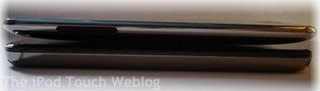


The left is the first generation and the right is the second generation.


Q: When I hold the front of my iPod to light, I see a light brown circle, what is that?
A: That is the ambient light sensor. It detects the amount of light that is in the room. This helps the iPod set the correct brightness. This only works when the light sensor setting is turned on in the settings app. To turn it on go to Settings and then Brightness, turn on Auto-Brightness. Now you will notice that in very sunny places, your brightness will turn high to help you see. In darker situations, the brightness will go dim to lessen strain on your eyes. Be aware that if this setting is on, you do waste more battery power, faster.


Q: Aren't some 3rd party apps illegal?
A: Yes.. some are, but those will NEVER be posted on this website. To get the fullest enjoyment out of your iPod there really isn't any reason to do those illegal activities. Those apps help you get the app store apps for free.

Q: What are cracked applications?
A: Cracked apps are applications that are from the app store that have been made so that they can be distributed to other people without having to pay for them. These apps are illegal and are usually very buggy. We highly recommend that you do not use these applications.

Q: What is firmware?
A: Firmware is the operating system of your iPod.

Q: How do I check what firmware I have?
A: To check, go to Settings, General, About, and then Version.

Q: I see all these great apps on your website but where do I get them from?
A: Most of the apps on The iPod Touch Weblog are apps from the app store. They can be bought from the app store right on your iPod or bought from iTunes and then synced on to your iPod. If you don't have the app store on your iPod, chances are that you aren't on firmware 2.0 or up. Message us if you want us to help you upgrade and be able to have apps on you iPod or check out this.

Q: What is SSH? And how is it related to WinSCP and Cyberduck?
A: SSH connecting you iPod to your computer wireless. SSH takes up a lot of battery power so turn it off from BossPrefs or SBSettings when it is not in use. WinSCP is a Windows program that allows you to view every single file in your iPod. Cyberduck is a Mac equivalent.

Q: What is a repo and a source?
A: A repo, short for repository, is a website that contains packages that can be downloaded from Cydia. A source is the same thing.

Q:Can I still use iTunes and paid applications from the app store on my jailbroken iPod?
A:Yes, jailbreaking only adds to the features of your iPod it doesn't take away anything. Every aspect of your iPod that you have right now, will be able to be used after jailbreaking.

Q: When I try to get the free apps from the app store, iTunes asks me for a credit card number so I can make a account. Is there any way I don't have to give away my credit card?
A:Yes there is. There are two methods to get an iTunes account with out having to give away your credit card number. Here is one, and here is the other. Either method should work, just be sure that you are on the latest iTunes version.

Q: How do I verify my iTunes account?
A: Go to the e-mail address you used to sign up for your iTunes account. There will be an e-mail from iTunes with a link. Click on the link and your account will be verified.

Q: Can I only transfer iTunes purchased music to my iPod?
A: No. If you have other music from a CD or already on your computer, you can transfer that into your iPod.

Q: What is bricking?
A: 'Bricking' you iPod means to mess up you iPod so badly that it has no function, essentially a $300 brick. This is virtually impossible to invoke, even you are trying on purpose to brick it.

Q: What is the first thing I should I do if the power and home buttons don't respond?
A: Hold down the home and power buttons at the same time for about 10-12 seconds let go when you see the Apple icon. Your iPod should then start up normally. If this doesn't work try DFU mode as a last resort, see below.

Q: What is DFU mode and how do I get my iPod into it?
A: DFU is Device Firmware Upgrade mode for your iPod. It should only be used as a last resort to restore your iPod. To get your iPod into DFU follow these steps:
  1. Turn on your iPod. If you can't get it to do anything, just get it as close to "on" as possible.
  2. Hold the power and home buttons down for 10 seconds.
  3. Let go of the power button and keep holding the home button.
  4. Your computer will detect your iPod and make a sound. When you hear the sound, you can let go of the home button and restore through iTunes.
Now you can restore using iTunes.

Q:Help! I messed up my iPod. OMG what am I going to do?
A:First, calm down! Then look at the previous two questions and follow the answers. If that doesn't work, just message us by clicking the Contact button at the top right of the screen. We've never had a problem we couldn't fix.

| 46 comments ]

Is this not the right jailbreak for you? Find the one made for your device and firmware by clicking here.

Untethered 2nd Generation iPod touch GUI jailbreak is out for PC! This is the latest jailbreak for iPod touch 2nd Generation. Download below.

Download for PC

This full GUI untethered jailbreak includes full jailbreak with complete instructions. There are no more command prompts or things to type in. Just plug in your iPod and go. Here is the main screen you will get when you install the program.


If you don't have LibUSB installed, click "Install LibUSB" You will also need a firmware 2.2.1 ipsw file. If you don't have one, it will automatically download one for you. Just click "Download". Then click next.

You will then be presented with this screen.


If you want Installer on your iPod, check "Install Installer" at the top. We don't recommend you do this. Cydia is automatically installed in the jailbreak process. If you want to use a custom boot logo check "Use Custom Boot Logo" and choose a picture by clicking "Change...". Then click "Create Firmware". This will create your custom firmware that you will later restore with. This process will take awhile. Once it's done, click next.

If QuickFreedom doesn't appear to be doing anything during this step, you can download our pre-made CustomFirmware.ipsw here.

You will then be presented with this screen.


You will need to enter your iPod touch into DFU mode. For a guide on how to do that, click on "DFU Instructions". You probably won't be able to do it on your first try, get a friend to help you. You can also try following these instructions:
Unplug your iPod and fully turn it off. Then get a friend to help you out with the next part. Tell your friend to push down the power button while you push the home button. In 2-3 seconds, the Apple logo will appear. Wait 2 seconds after it appears and then you can plug in the power cord. Then tell your friend to let go of the power button and you can keep holding the home button. Keep holding the home button until your iPod is recognised as in DFU mode.
Once you are in DFU mode, click on "Start Pre-Jailbreak". Once that is done, your iPods screen should be white, click next to continue.

Now this last screen will appear.


It will tell you that you need to restore to your Custom Firmware. Click Next.

To restore to your Custom Firmware, open iTunes and plug in your iPod. Just ignore any pop ups that may appear from iTunes.

While holding the "Shift" key on your keyboard, click the "Restore" button in iTunes.


A box will come up asking for a file.


Give it the CustomFirmware file that was created in an earlier step. Then wait for iTunes to restore your iPod. This can take awhile. Once it's done, you will be jailbroken!

Be sure to check out these guides on how to save battery life after jailbreaking and how to free up space after jailbreaking.

| 0 comments ]

The fight between who is going to be able to jailbreak all iPod touch's and iPhone's for both Mac and PC first has been getting very aggressive in the past week. All the developers have been coming up with secret code names for their projects, and for themselves, some have even created fake code names to throw us and their competition off. Here is a comprehensive list of the code names and their definitions. This page will be updated if new code names come out (and they probably will).

Jailbreaking Tool Developers:

  • iH8sn0w- Jailbreaker who is working to port Dev Team's PwnageTool to Windows. The ported version is to be called sn0wbreeze (see below). More Info.
  • GeoHot- The user name for George Hotz. He was the one who found the original iPhone exploit and released Purplera1n. He is currently developing Blackra1n (see below). More Info.
  • DarkMalloc- Working with iH8sn0w. More Info.
Jailbreaking Tools:
  • Blackra1n- A jailbreak by GeoHot (see above) the supposedly jailbreak the iPod touch 3G. More Info.
  • Appuloha1l-An easy-to-use jailbreak by the same jailbreaker as Chocolatera1n. It is expected to be released on October 11, 2009. [Fake]
  • Chocolatera1n- A more advanced jailbreak by the same jailbreaker as Appuloha1l. Supports the H1ssingsnake exploit. Has ability to download Cydia packages and update from the app itself. It is expected to be released on October 12, 2009. More Info. [Fake]
  • Bananam1lkshake- A new jailbreaking tool that is for iPhone 3G[S] users that will be able to jailbreak even if the USB and H1ssingsnake exploits are fixed by Apple. But this is only a back-up plan (Possibly fake). More Info.
  • sn0wbreeze- A ported version of PwnageTool to Windows, ported by iH8sn0w and DarkMalloc. Sn0wbreeze is to be released by October 12, 2009.
Exploits:
  • H1ssingsnake- An exploit required by Chocolatera1n to jailbreak.
  • USB-An software exploit that is used by Appuloha1l.
  • ECID- Used by Bananam1lkshake as a back-up plan for iPhone 3G[S] jailbreakers in-case other exploits are fixed in updates by Apple (Possibly fake). More Info.

| 1 comments ]


Is this not the right jailbreak for you? Find the one made for your device and firmware by clicking here.

The iPhone Dev Team and Comex have come out with an all-in-one online jailbreak called JailbreakMe 2.0. The process to jailbreak is fairly simple if you are an experienced jailbreaker but if not, use the guide below.

This jailbreak is for the following iPod touches:

iPod 1G on 3.1.2
iPod 1G on 3.1.3
iPod 2G on 3.1.2
iPod 2G on 3.1.3
iPod 2G on 4.0
iPod 3G on 3.1.2
iPod 3G on 3.1.3
iPod 3G on 4.0

This jailbreak, unlike some other previous jailbreaks, does not require the use of a computer.

Read: Make sure you have already Synced your iPod touch with iTunes.
  1. Tap on the Safari icon on your homescreen.
  2. In the adress bar, type in: http://www.jailbreakme.com. Then press Go.
  3. Once the page loads, a slider will be presented at the bottom of your screen. Slide it from left to right to start. (If you see a purple screen, close Safari and restart your device. Then start at Step 1 again.)
  4. Now wait for JailbreakMe to download the required files.
  5. Then JailbreakMe will begin to install the correct files and jailbreak your device.
  6. Once it's done, a message will popup saying "Cydia has been added to the homescreen."
  7. Close Safari and open Cydia, wait for Cydia to restart.
  8. Open Cydia once again.
Now you can begin installing themes, apps, games, and more in Cydia

| 3 comments ]

Is this not the right jailbreak for you? Find the one made for your device and firmware by clicking here.

Comex has released his latest jailbreak masterpiece. His latest creation is JailbreakMe, an online-based jailbreak that requires no use of a desktop computer to jailbreak.

The jailbreak is avaiable to the following devices:

iPod 1G on 3.1.2
iPod 1G on 3.1.3
iPod 2G on 3.1.2
iPod 2G on 3.1.3
iPod 2G on 4.0
iPod 3G on 3.1.2
iPod 3G on 3.1.3
iPod 3G on 4.0
iPad on 3.2
iPad on 3.2.1
iPhone 3G on 3.1.2
iPhone 3G on 3.1.3
iPhone 3G on 4.0
iPhone 3G on 4.0.1
iPhone 3G[S] on 3.1.2
iPhone 3G[S] on 3.1.3
iPhone 3G[S] on 4.
iPhone 3G[S] on 4.0.1
iPhone 4 on 4.0
iPhone 4 on 4.0.1

All that is required by the user is to go to http://www.jailbreakme.com/ on your iDevice and slide the Slide to Jailbreak button.

| 3 comments ]

Reports from Chinas cellphone carrier, Unicom, say that will be offering a jailbreak, along with some other extra features.


The image above says 
Support Service: Free SIM-trimming, jailbreak, installation of more than 10 hot apps.
The posters also show that a jailbreak will also be provided for the iPad.

With 4.0.2 stopping the JailbreakMe.com jailbreak, it will be interesting to see how Unicom would jailbreak these devices or provide only older firmware devices.

Since jailbreaks are readily available and provided free to everybody, it may be the deal-breaker for cellphone buyers bringing in more profit for Unicom.

It will be interesting to see how Apple will react to this information.

[Via 9to5Mac]

| 0 comments ]

So you've heard somethings about jailbreaking, but what are the facts and what is just gossip?

Before we start, a few quick facts about jailbreaking:

  • Currently, out of the 75 million iPods/iPhones, 7,500,000 (10%) devices are jailbroken. This number is growing each day.
  • Jailbreaking gives the user full access to all files on the device which are originally restricted by Apple
  • Jailbreaking and unlocking are different. Unlocking is only for the iPhone. It allows users to use their iPhone on networks besides what Apple allows them to.

| 3 comments ]

Is this not the right jailbreak for you? Find the one made for your device and firmware by clicking here.

The newly released Apple firmware 4.0.2 fixes the PDF security hole that was used by JailbreakMe to jailbreak without the use of a computer. Though JailbreakMe does not jailbreak 4.0.2, Redsn0w is able to jailbreak iPhone 3G, and iPod touch 2G (non-MC model).

| 0 comments ]

Firmware 3.0 is now out on iTunes for download.


This update is free for all iPhone users and $9.95 for all iPod touch users. The 3.0 firmware includes:

  • Ability to purchase movies, TV shows, and audio books through WiFi.
  • Copy and Paste
  • A landscape keyboard for apps like Mail, Notes, and Stocks.
  • The Spotlight search witch allows you to search your entire device.
  • P2P ability
  • Stereo bluetooth
Please be aware that if you do update to the 3.0 firmware, you will become unjailbroken. A jailbreak for the 3.0 firmware is expected to be released this Friday (June 19, 2009). You can either upgrade and wait for a jailbreak or wait until Friday and then upgrade and jailbreak. The 3.0 jailbreak is now out by the Dev Team, you can find out how to jailbreak your device on 3.0 firmware here.

| 2 comments ]


Is this not the right jailbreak for you? Find the one made for your device and firmware by clicking here.

An entire day before Greeopois0n is supposed to be released, geohot has publicly released limera1n. Limera1n will jailbreak iPhone 3GS, iPod touch 3G, iPad, iPhone 4, and iPod touch 4G on firmware 4.0-4.1.

Limera1n is completely untethered on all of these devices. This means that you don't need to run limera1n everytime you restart your device.

Limera1n is only supported on Windows OS. Lunix and Mac versions will be coming later. For more information on the jailbreak, visit the official site.

Update: Limera1n now supports Windows and Mac.

How to Jailbreak

  1. Make sure you're on any 4.x.x firmware by going into Settings, General, About, and then Version.
  2. Download and open limera1n RC1b4
    Windows - http://www.megaupload.com/?d=VLXEIVYF
    Mac - 
    http://www.megaupload.com/?d=HKDIAZ69
  3. Plug in your device into your computer. Double click on Limera1n, click Run (if you get the option).
  4. Press Make it ra1n on your computer.
  5. Wait until the limera1n logo comes up. If you don't get the image, just restart your device, close limera1n, and repeat steps 3 and 4.
  6. Once your device reboots (you may need to hold down the power button to turn it on), you should see a limera1n icon on your homescreen, tap on it. If you don't see limera1n, restart your device.
  7. Make sure you're connected to the internet, select Cydia, and tap on install. Restart your device if you don't see Cydia come up.
  8. Limera1n will now download and install Cydia, once it's done, Cydia will be on your homescreen.

| 0 comments ]


Is this not the right jailbreak for you? Find the one made for your device and firmware by clicking here.

The iPhone Dev Team has released a jailbreak for iPhone 3G and iPod touch 2G for use on Windows or Mac.

This jailbreak will add multitasking, homescreen wallpaper, and battery percentages which is not currently allowed by Apple on to these devices.

Devices Supported:  iPhone 3G, iPod touch 2nd Gen
Computer OS Supported: Windows and Mac
Firmware Supported: 4.0

Necessary Downloads redsn0w 0.9.5b5 for Windows or redsn0w 0.9.5b5-4 OS X, iPhone 3G 4.0 Firmware or iPod touch 2G Firmware

1. Turn off your device and plug it into your computer. Open redsn0w and click the Browse button.

| 0 comments ]

Spirit by comex has been released. Spirit jailbreaks all iDevices and is 100% untethered (even for iPod touch 3G).

Devices Supported: iPhone 2G, iPhone 3G, iPhone3GS, iPod touch 1G, iPod touch 2G, iPod touch 3G, and iPad
Computers Supported: PC and Mac
Firmware Supported: 3.1.2, 3.1.3, 3.2
Necessary Downloads: iTunes 9 (or higher) and Spirit jailbreak

| 0 comments ]

Apple has officially released iOS 4.2. This update brings the long-awaited multitasking, wallpaper, and speed updates to the iPad. The device also covers the iPhone 4, iPhone 3GS, iPhone 3G, Second Generation iPod touch, Third Generation iPod touch, and Fourth Generation iPod touch.

If you're having problems updating to iOS 4.2, make sure that your iTunes is updated to the current version.

Jailbreak is not yet supported for this firmware. Updating to iOS 4.2 will remove the jailbreak from your device and restore it to Apple's original firmware. A jailbreak for 4.2 should be released in a few weeks at the latest. We may even see a jailbreak in the next few days.

| 0 comments ]

Confused about some of the words used on this site and others in the iPod touch community? Use this as your mini-dictionary.

Accelerometer
A 3-axis device that is implemented into your iPhone or iPod touch to tell which way it is facing.

Baseband
The baseband, only in iPhones, gives the firmware access to its modem chip.

Bricking
'Bricking' you iPod means to mess up you iPod so badly that it has no function, essentially a $300 brick. Some users think this may have happened to their device but this is virtually impossible, bricking only happened in the very first firmwares (1.1.1).

DFU Mode
DFU is Device Firmware Upgrade mode for your iPod. To get your device into DFU follow the directions below:

  1. Turn on your iPod. If you can't get it to do anything, just get it as close to "on" as possible.
  2. Hold the power and home buttons down for 10 seconds.
  3. Let go of the power button and keep holding the home button.
  4. Your computer will detect your iPod and make a sound. When you hear the sound, you can let go of the home button and restore through iTunes.

Emu/Emulator
An Emulator is a program that simulates the conditions of another device. If you jailbreak, you can get Gameboy, NES, and Playstation 1 (PSX) emulators for your device.

Firmware
Firmware is the operating system of your iPod. To your firmware version, on your iPod go to Settings, General, About, and then Version.

Home Button
The circular button found on the front face of your device.

Jailbreak
Jailbreak is making you iPod Touch available to apps and other upgrades that aren't from Apple. This includes themes, games, music, downloads, and much more.

Power Button
The thin button found at the very top of your device.

Repo/Source
A repo, short for repository, is a website that contains packages that can be downloaded from Cydia. A source is the same thing.

Springboard
Essentially the 'Desktop' of your iPod. This is where your icons are located.

SSH
This allows you to connect to your device from your computer and view all files inside of it. You can use WinScp or Cyberduck to do this.

Unlock
If you unlock your iPhone, you can use it with other carriers besides the ones that Apple would like you to use. This requires a jailbreak.

| 0 comments ]

The Dev Team has released the redsn0w beta jailbreak for all iPhone 3Gs and iPod touch 2Gs on the firmware 4.0GM.

This jailbreak will, by default turn on multitasking and homescreen wallpapers which is not normally allowed on these two devices by Apple.

If you are using a carrier unlock, do not upgrade to 4.0GM firmware until the official 4.0, and ultrasn0w unlock, are released as it will update your baseband as well as not allowing you to hacktivate your device.